引用自:
 | Hi! Everyone! My name is Weil Jimmer. This is my personal blog. I'm a webmaster of this site. I hope the site will be popular. Now, Let's go! Enjoy gaining more knowledge. |
Found 138 records. At Page 17.
    private void msg_box(String title, String msg)    {
        AlertDialog.Builder alertDialog = new AlertDialog.Builder(this);
        alertDialog.setTitle(title);
        //alertDialog.setPositiveButton("OK", this);
        //alertDialog.setNegativeButton("Cancel", this);
        alertDialog.setMessage(msg);
        alertDialog.show();
    }
This entry was posted in Functions, Java By Weil Jimmer .
.
使用 getSharedPreferences 函數儲存數據。
APP_NAME 改成 想設計的名稱,如:org.twgogo.wbf.Code_.web_browser
    public boolean set_config(String str,String name_){
        SharedPreferences sharedPref = getSharedPreferences("APP_NAME", MODE_PRIVATE);
        SharedPreferences.Editor editor = sharedPref.edit();
        editor.putString(name_, str);
        editor.apply();
        return true;
    }
public String read_config(String name_){
SharedPreferences sharedPref = getSharedPreferences("APP_NAME", MODE_PRIVATE);
return sharedPref.getString(name_,"NULL");
}
This entry was posted in Experience, Functions, Java By Weil Jimmer.
簡言之,RichTextBox 若裡面包含圖片的話(比如用剪貼簿的方法貼上RTF格式圖片),滾動就會顯得很有問題,不管是用右邊的滾動條上鍵、下鍵移動,或是用滑鼠滾輪滾動,都會「快速跳躍圖片」,意指:把圖片當成「一行文字」看待,尤其是當圖片很長(Height大於RichTextBox的高)的時候,而且又多張圖片,快速滾動就有可能發生,但問題是,我去網路上查很多資料都沒查到有什麼方法可以修正,當然是希望能用一行Code,就解決這個問題,不然滾動圖片「咻」一下就不見了,已經滾到最下面了,根本爛透了。
本方法以Vb.net Code為例,原代碼從網路上查到是 C#.Net,但是原代碼是按下按鈕自動平滑滾到最下面,而我這個是依照滑鼠滾輪而去做上下正常平滑滾動,意思是指修正滑鼠的快速滾動問題,稍微修改了原代碼,原本想貼上引用的地址,不過都關掉網頁,懶得查記錄了,好吧,也算是原創,因為有些還是我自己再添加的。
要先創建一個 Timer,代碼中 ID 為「Scroll_timer」。其餘不解釋,看代碼就明白。
    Private min, max As Integer
    Private pos As Integer = 0
    Private endPos As Integer = 0
    Private Const SB_HORZ As Integer = &H0
    Private Const SB_VERT As Integer = &H1
    Private Const WM_HSCROLL As Integer = &H114
    Private Const WM_VSCROLL As Integer = &H115
    Private Const SB_THUMBPOSITION As Integer = 4
    Private Const WM_SETREDRAW As Int32 = &HB
    Private scroll_speed As Integer = 20

    Private Declare Function SetScrollPos Lib "user32" (hwnd As IntPtr, nBar As Integer, nPos As Integer, bRedraw As Boolean) As Integer
    Private Declare Function GetScrollPos Lib "user32" (hwnd As IntPtr, nBar As Integer) As Integer
    Private Declare Function PostMessage Lib "user32" Alias "PostMessageA" (hwnd As IntPtr, nBar As Integer, wParam As Integer, lParam As Integer) As Integer
    Private Declare Function GetScrollRange Lib "user32" (hwnd As IntPtr, nBar As Integer, ByRef lpMinPos As Integer, ByRef lpMaxPos As Integer) As Boolean
    Private Declare Auto Function SendMessage Lib "user32.dll" (ByVal hWnd As IntPtr, ByVal wMsg As Int32, ByVal wParam As IntPtr, ByVal lParam As IntPtr) As IntPtr


    Private Sub Scroll_timer_Tick(sender As Object, e As EventArgs) Handles Scroll_timer.Tick

        GetScrollRange(RichTextBox1.Handle, SB_VERT, min, max)
        max = max - RichTextBox1.ClientSize.Height
        pos = GetScrollPos(RichTextBox1.Handle, SB_VERT)
        Debug.WriteLine("Max=" & max & "--Min=" & min & "--Current=" & pos)
        If Scroll_timer.Tag = "down" Then
            If (pos >= endPos) Then
                Me.Scroll_timer.Enabled = False
                Exit Sub
            End If
            If endPos >= max Then
                endPos = max
            End If
            pos = pos + scroll_speed
            SetScrollPos(RichTextBox1.Handle, SB_VERT, pos, True)
            PostMessage(RichTextBox1.Handle, WM_VSCROLL, SB_THUMBPOSITION + &H10000 * pos, 0)
        Else
            If endPos <= 1 Then
                endPos = 1
            End If
            If (pos <= endPos) Then
                Me.Scroll_timer.Enabled = False
                Exit Sub
            End If
            If (pos - scroll_speed) < 1 Then
                pos = 0
            Else
                pos = pos - scroll_speed
            End If
            SetScrollPos(RichTextBox1.Handle, SB_VERT, pos, True)
            PostMessage(RichTextBox1.Handle, WM_VSCROLL, SB_THUMBPOSITION + &H10000 * pos, 0)
        End If
    End Sub

    Private Sub RichTextBox1_MouseWheel_Click(sender As Object, ByVal e As System.Windows.Forms.MouseEventArgs) Handles RichTextBox1.MouseWheel
        Dim temp As HandledMouseEventArgs = e
        temp.Handled = True
        Dim temp_pos = GetScrollPos(RichTextBox1.Handle, SB_VERT)
        If Scroll_timer.Enabled = True Then
            temp_pos = endPos
        Else
        End If
        If e.Delta > 0 Then
            Debug.WriteLine("Scrolled up!" & e.Delta)
            GetScrollRange(RichTextBox1.Handle, SB_VERT, min, max)
            endPos = temp_pos - e.Delta
            If endPos <= 1 Then
                endPos = 1
            End If
            Debug.WriteLine(endPos)
            Scroll_timer.Tag = "up"
            Me.Scroll_timer.Enabled = True
        Else
            Debug.WriteLine("Scrolled down!" & e.Delta & "--Current: " & temp_pos)
            GetScrollRange(RichTextBox1.Handle, SB_VERT, min, max)
            max = max - RichTextBox1.ClientSize.Height
            If temp_pos + Math.Abs(e.Delta) >= max Then
                endPos = max - 1
            Else
                endPos = temp_pos + Math.Abs(e.Delta) - 1
            End If
            Debug.WriteLine(endPos)
            Scroll_timer.Tag = "down"
            Me.Scroll_timer.Enabled = True
        End If
    End Sub
This entry was posted in Functions, VB.NET By Weil Jimmer.
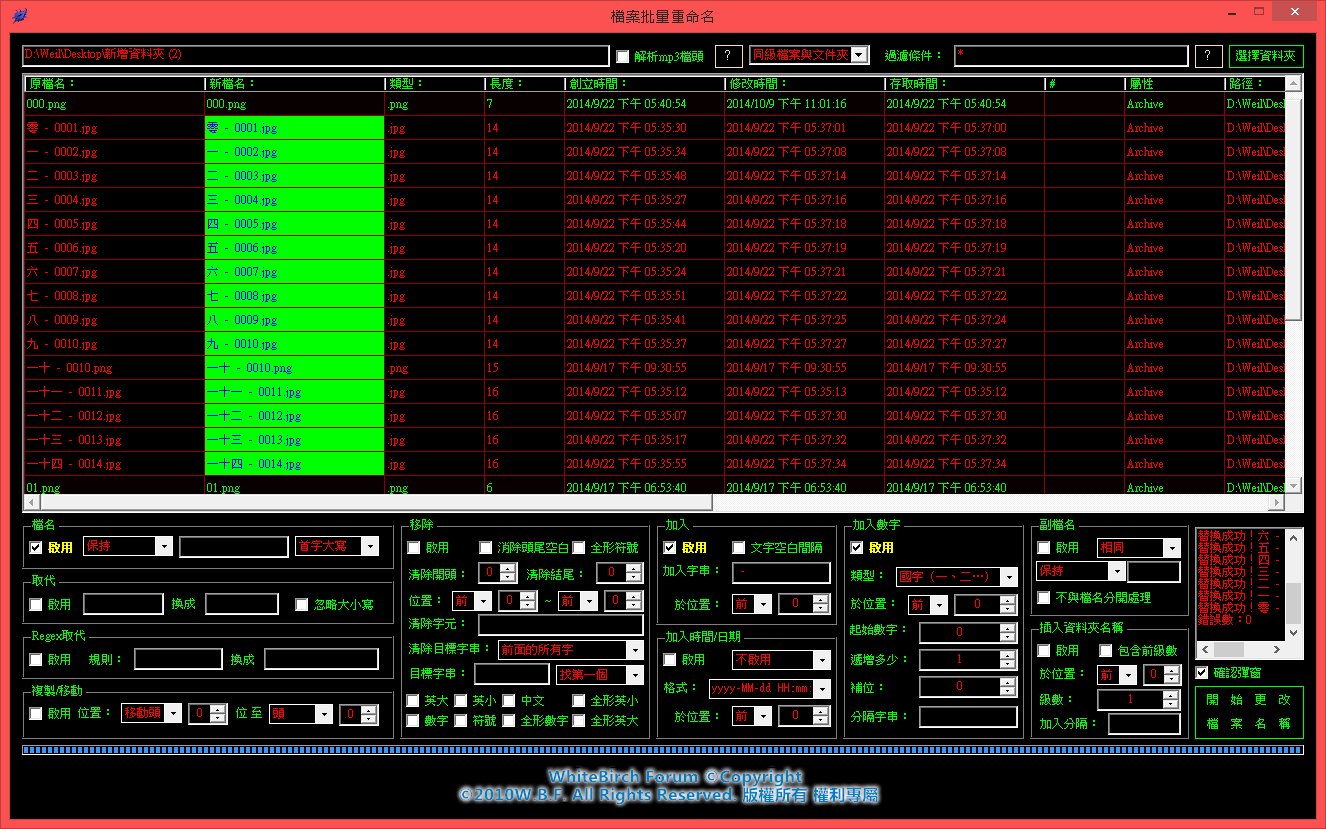
主要功能:
一、可過濾檔案名稱並以資料夾或檔案型式快速取得列表。
二、支援正規表示式語句或一般字串替換成新字串。
三、可複製移動檔案名稱於任意位置插入。
四、可插入/清除任意合法字串於任意位置。
五、可清除全、半形、中英文大小寫、數字、符號。
六、可插入檔案存取、變更、創立時間於任意位置,時間格式自訂。
七、可使檔案名稱數字化,目前支援:a-z、A-Z、a-zA-Z、A-Za-z、羅馬數字、國字(一、二…)、大寫國字(壹、貳…)、2~62進位法,可設定開始數字(可為負數)、與遞增數(可為負數),與支援補滿位數至任意位,本數字化系統支援大數快速運算,不會溢位!
八、可變更副檔名為英文大小寫、題題、反轉、附加設定、轉繁體、轉簡體……等,並可以設定不分開進行命名設置動作。
九、可插入目錄資料夾名稱級數,以,包含插入第一級,第二級…或第一級與第二級,第一級與第二級與第三級……目錄名稱,可以分隔符號分開。
十、包含Mp3文件頭的解析,可以在列表中依TrackNum、Title、Artist、Album、Genre、Year、Duration排序。
更新 - 2015.12.22:
為了Windows XP加入x86版本。
更新 - 2016.08.06:
修復重命名子資料夾下檔案的Bug所造成的錯誤。
更新 - 2017.04.24:
加入新功能,現在可以批量變更檔案名稱由GBK轉BIG。
最新版本:1.0.0.3
下載地址【一】64位元電腦:https://url.weils.net/o
下載地址【一】32位元電腦:https://url.weils.net/j
下載地址【二】64位元電腦:https://my.pcloud.com/publink/show?code=XZp1rAZRmC9fntTQSuzGI00G5mUjLvM4R5X
下載地址【二】32位元電腦:https://my.pcloud.com/publink/show?code=XZW1rAZ0xTdErds0h8HPvfp6pxmvYbzzbdk
This entry was posted in Product, Tools By Weil Jimmer.

| This site also need a little money to maintain operations, not entirely without any cost in the Internet. Your donations will be the best support and power of the site. | |
| Method | Bitcoin Address |
 |  |
 | |
 Linode Linode | |






White Birch Forum © Copyright
©2010- W.B.F. All Rights Reserved.
Weil Jimmer Web PHP Script